![tomis white.png]](https://support.tomis.tech/hs-fs/hubfs/tomis%20white.png?height=42&name=tomis%20white.png)
The Chatlogs page is your behind-the-scenes view into how guests are interacting with your chatbot. Chatlogs are found located in your TOMIS app under Marketing HQ → ChatBot→ Chat Logs.
Utilizing this page helps you fine-tune your bot over time, turning guest feedback into stronger, more helpful conversations. Think of it as your chatbot’s report card, with all the tools to improve performance at your fingertips. Every conversation is saved here so that you can:
- See what users are asking
- Check how the bot responded
- Spot gaps or issues to improve future answers
Chatlogs are one of the most valuable tools for keeping your bot helpful, accurate, and up to date.
What You’ll See in Chat Logs
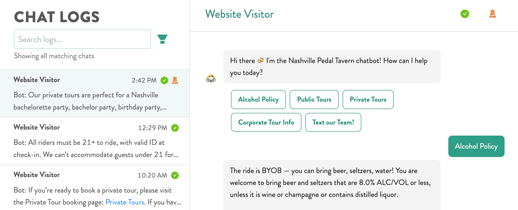
Each entry in the lefthand list represents a unique guest conversation. Click any entry to read the full exchange.
You can:
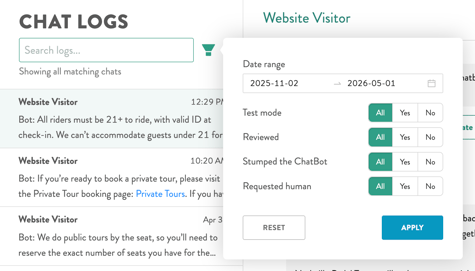
- Search for keywords (such as “cancellation”, “private tour”, “Sunset Dolphin Tour”)
- See whether a log has been marked as reviewed
- Filter by:
- Date range
- Test mode vs. live chats
- Chats that “stumped the chatbot”
- Conversations where users requested a human
What the Icons Mean
- Orange test tube = A test-mode chat from the interal chatbot testing tool. These do not count toward reporting.
- Checkmark icon (top-right) = Lets you mark a conversation as reviewed, helping you track what you’ve already looked at.
This is handy for large teams or when reviewing several chats over time.
Why Chat Logs Matter
You can use Chat Logs to:
- Identify common questions your guests are asking
- Spot confusing answers or places where the bot said “I’m not sure”
- Update your FAQ content with real guest language
- Catch errors in answers or product descriptions
This makes it easy to spot trends, review specific situations, or check if recent edits improved responses.
If you see a pattern of confusion or missing info, it’s a good idea to update your Knowledge Base or review the Products content. For major issues or unclear responses, reach out to us anytime at chatbotsupport@tomis.tech.