![tomis white.png]](https://support.tomis.tech/hs-fs/hubfs/tomis%20white.png?height=42&name=tomis%20white.png)
The Products Page is where your chatbot connects directly with your reservation system to stay up to date on your offerings, whether those are tours, rentals, or special experiences. You don’t need to rewrite all your tour content from scratch. The TOMIS app pulls in the product info you're already using in your booking system and makes it usable by the chatbot.
Automatically Synced with Your Reservation System
Each product listed here (ex: “2 Hour Bike Rental” or “Sunset Lighthouse Tour”) has been synced from your reservation system and reviewed by the TOMIS team. This means:
- Tour names, descriptions, and pricing update automatically
- TOMIS refreshes the data daily
- You can also make manual edits if needed, as long as you override the daily sync for that item.
⚠️ Not all reservation systems are currently integrated, but most major platforms are. Please reach out to the TOMIS team to check compatibility.
What You See on the Products Page
The Products List
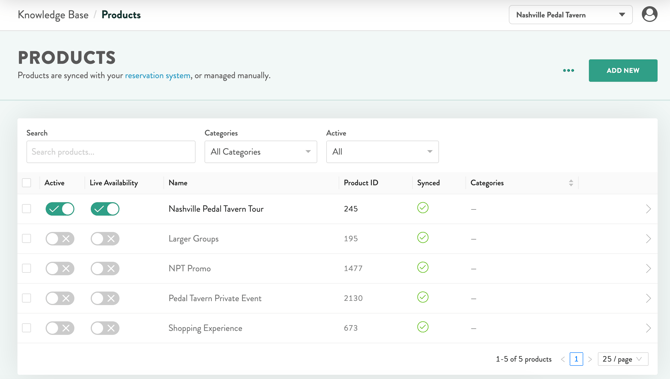
Use the tools across the top to find what you're looking for:
|
Field |
What it does |
|---|---|
|
Search |
Look up products by keyword |
|
Categories |
Filter the list down to a single category |
|
Active |
Filter to show only active or inactive products |
Each row shows:
|
Field |
What it does |
|---|---|
|
Active |
Whether the AI Agent knows about this product at all |
|
Live Availability |
Whether guests can check live availability for this product in the chat widget |
|
Name |
The product title |
|
Product ID |
The ID from your reservation system, for reference |
|
Synced |
Shows whether TOMIS is currently syncing that product's info |
|
Categories |
The category (or categories) assigned to the product |
NOTE: Click ADD NEW to manually add a product that isn't synced from your reservation system.
Editing a Product
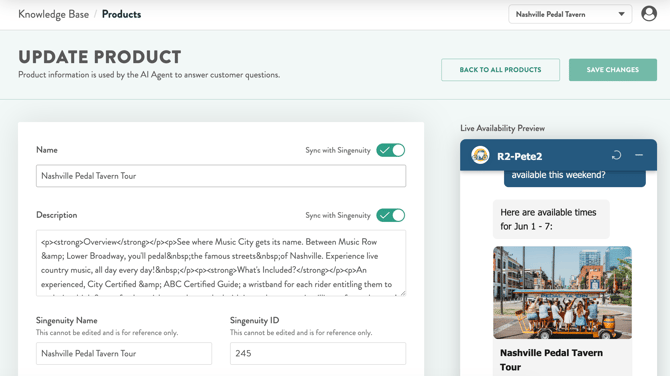
Clicking EDIT lets you see and adjust:
- Product name and description
- Pricing details
- Nicknames (alternate names guests might use, like “Sunset Tour” or “Evening Kayak”)
- Image and Reservation System ID
NOTE: You must pause syncing for that item if you’d like to edit a tour description within the app. We recommend you update your tour descriptions within the reservation system itself.
How the Chatbot Uses Product Info
Your chatbot pulls from your product descriptions the same way it pulls from your FAQ content. So if a guest types: “Do you offer kayak rentals on the lake?” or “What food tours do you have?” the chatbot can respond with your product details, even including pricing, tour type, or a short description if it’s available in the synced content.
Have questions about syncing or want help refining your product content for the chatbot? The TOMIS team is here to support you.