![tomis white.png]](https://support.tomis.tech/hs-fs/hubfs/tomis%20white.png?height=42&name=tomis%20white.png)
Great content leads to a better chatbot. The TOMIS team has built the foundation of your chatbot using your website content and any branding materials your team provided during configuration. From here, the bot is yours to grow.
Your bot's content needs aren't static. As your business evolves — new trips, updated policies, seasonal offerings — your knowledge base should evolve with it. This guide walks you through the best practices we use internally so you can confidently expand your FAQs and keep your chatbot performing at its best.
Best Practice Guidelines
1. Use specific names in FAQ titles and answers

When you write an FAQ, include the actual product, tour, or category name in both the title and the response. This is the single biggest thing you can do to improve answer accuracy.
|
✓ DO Title: How long is the Full Day Whitewater Rafting trip? Response: The Full Day Whitewater Rafting experience is 2 hours long. |
✗ DON'T Title: How long? Response: The trip is 2 hours. |
Why it matters: Including the product name in both fields helps the chatbot match user questions to the right answer. It also makes sure your customers immediately understand which trip or service the answer applies to — so they don't have to ask a follow-up to confirm.
2. Tag FAQs with the right category
Choose or create a tag for the category your FAQ belongs in. Common examples include:
- Location
- Reservations & Policies
- What to Bring / Wear
- Food & Beverage
- Activity-specific tags (Rafting, Ziplining, Watersports, etc.)
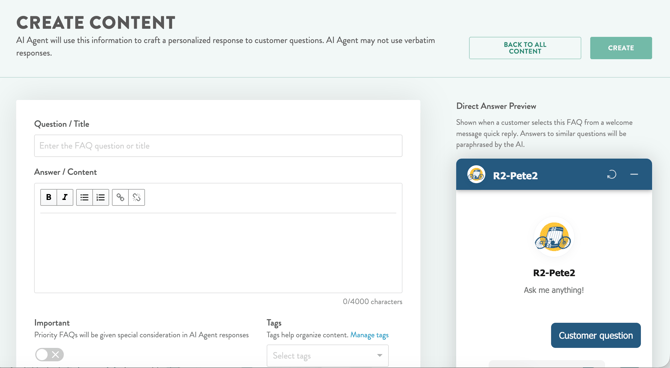
Why it matters: Tags help the AI narrow down which FAQs to pull from when answering a question. They also make it much easier for you to audit your content — when you want to review every Reservations and Polices FAQ, you can filter by one tag instead of scrolling.
3. Write clearly, concisely, and in your guests' words
Use the phrasing and vocabulary you actually hear from your customers. Don't worry about polished, marketing-perfect copy — the bot will paraphrase based on the user's question. Bullet points are your friend for clarity.
|
TIP If you find yourself repeating the same question from guests over the phone or by email, that's a sign it should be an FAQ. Use the exact wording you hear in the wild. |
4. Break large topics into smaller FAQs
Err on the side of caution with long, sprawling FAQs. If an answer is trying to cover too many things at once, split it up.
Example: Instead of one FAQ called "Group Offerings" that covers everything, create separate FAQs for:
- Field Trips
- Corporate Groups
- Weddings
- Birthday Parties
- Bachelor / Bachelorette Parties
Why it matters: Smaller, focused FAQs give the AI a higher confidence score when matching a user's question. The more targeted each FAQ is, the more accurate the response.
5. Use Rich Text formatting to add helpful links
When a question naturally points to a page on your website (a booking page, a pricing chart, a directions page, a packing list), add the link directly in the FAQ response using the Rich Text editor. The bot will surface those links to your customers, giving them a clear next step.
6. Use the Important/Priority Star for Critical FAQs
|
What the Priority Star does When you mark an FAQ as Priority (the star icon), the bot delivers your full response verbatim instead of paraphrasing or pulling only what it considers relevant. Use it any time the exact wording matters. |
There is no limit to how many Priority FAQs you can have. Use the star for any topic where being precise protects your business or the guest experience. Common examples:
- Cancellation and refund policies
- Waiver and liability language
- Age, weight, and physical eligibility requirements
- Trip protection or travel insurance details
- Pricing structure or non-negotiable terms
|
Why this matters Cancellation policy and physical eligibility are the two FAQ categories most likely to cause lost bookings when answered incorrectly. Priority-starring these FAQs is the single biggest thing you can do to reduce hallucination risk on high-stakes topics. |
7. Test your changes before calling it done
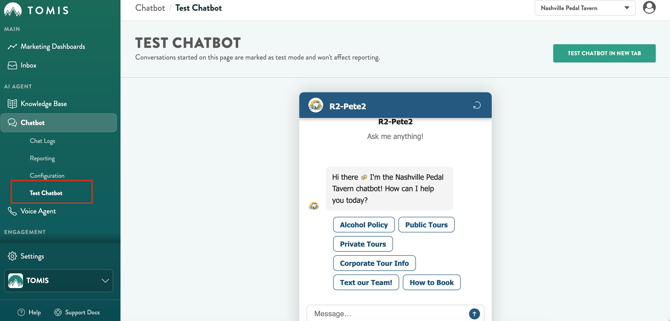
After you add or edit an FAQ, run a few test questions in the Test Chatbot tab to confirm the bot is pulling the right answer. If something seems off — wrong FAQ surfacing, strange phrasing, made-up details — let the TOMIS Chatbot team know so we can take a look.
Where to Focus First
If you only have time to audit and improve a handful of FAQs, start with these. They consistently have the biggest impact on customer trust and bookings:
|
Topic |
Why it deserves extra attention |
|---|---|
|
Cancellation & Refund Policy |
Policies vary by activity, season, and product, so generic answers create confusion and erode trust. Make sure each trip or product has its own clear policy FAQ. |
|
Physical Eligibility & Restrictions |
Weight minimums, age requirements, and health restrictions are make-or-break information for guests. An unanswered question here is often a lost booking. |
|
Pricing & What's Included |
Customers want to know what they're paying for. Spell out what's included, what's not, and any add-ons or fees. |
|
What to Bring & Wear |
Helps guests show up prepared and reduces day-of friction. Tailor by activity and season. |
|
Location, Parking & Meet-Up |
Wrong directions on the morning of a trip is one of the most stressful things a guest can experience. Be specific. |
Quick Checklist
Run through this list to review your new or edited FAQs:
- Title includes the specific product or category name
- Response repeats the product or category name
- FAQ is tagged with the right category
- Answer is concise and uses your guests' language
- Relevant links are added using Rich Text formatting
- Topic is focused — split into multiple FAQs if it's covering too much
- Priority Star is activated if desired
- Tested in the Test Chatbot tab to confirm the right FAQ surfaces
Need a Hand?
Your chatbot should feel like a teammate, not a chore. If you spot strange responses, hallucinations, or anything that doesn't match your brand voice, the TOMIS Chatbot team is here to help at chatbotsupport@tomis.tech
|
REACH OUT TO US Run a few tests in the Test Chatbot tab and send us specific examples of what's not working. The more detail you give us (the question asked, the response received, what you expected instead, and any relevant Chatlog URLS) the faster we can help you tune the bot. |