![tomis white.png]](https://support.tomis.tech/hs-fs/hubfs/tomis%20white.png?height=42&name=tomis%20white.png)
Welcome to Your TOMIS Chatbot
Getting Started with the Knowledge Base
This is where you'll manage what your chatbot — and your Voice Agent, if it's part of your plan — knows and says to guests. The Knowledge Base has two areas: Content, your FAQ library, and Products, which syncs with your reservation system. This guide covers Content. From common questions to business-critical details, this is where you build and edit the answers your guests receive.
Finding the Content Page
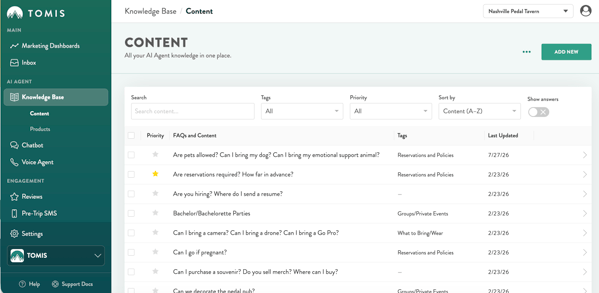
In the left-hand navigation, look under AI Agent > Knowledge Base, then select Content.
NOTE: Looking for tour or rental info instead? That lives one tab over, under Knowledge Base > Products — see the separate Products Page guide.
What You See on the Content Page
Each row represents a question-and-answer pair that the chatbot uses to respond to guests — anything from “Are pets allowed?” to “How do I make a reservation?” The table shows:
- Priority — the star icon, filled gold when an FAQ is marked Priority
- FAQs and Content — the question itself. Click any row to expand it and view or edit the full answer
- Tags — the category (or categories) assigned to that FAQ
- Last Updated — the date it was last edited
Searching, Filtering & Sorting
Use the tools across the top of the page to find exactly what you're looking for:
- Search — look up content by keyword
- Tags — filter the list down to a single category
- Priority — filter to show only Priority FAQs, or only non-Priority FAQs
- Sort by — reorder the list (alphabetically, by most recently updated, and other options)
Show Answers
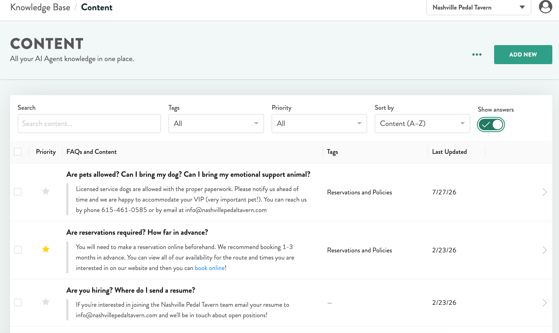
Toggle Show Answers (top right) to display full answer text right in the list, instead of opening each row one at a time. This is the fastest way to scan a large batch of content at once — for example, when you're auditing everything tagged Reservations and Policies for accuracy.
⭐ Priority FAQs
Use the star in the Priority column to mark important or sensitive questions, such as cancellation policies, waivers, or anything with legal or financial impact.
WHY THIS MATTERS: Priority content is treated with extra care so your most critical answers are always delivered exactly as written — it's a safeguard against confusion or misinformation.
Tags: Organize with Purpose
Each Q&A can be labeled with a tag, such as “General,” “Rafting,” or “Walking Tours.” Tags help your chatbot group and prioritize responses behind the scenes.
WHY THIS MATTERS: If two questions are similar, tags help guide the chatbot to the right response, making conversations smoother for your guests. They also make it easy to filter the Content list down to one category at a time.
Adding & Editing Content
- Click ADD NEW (top right) to create a new FAQ
- Click any row — or the arrow at the end of it — to expand and edit an existing one
- Use the checkboxes on the left to select multiple rows at once
Bulk Editing with Import & Export CSV
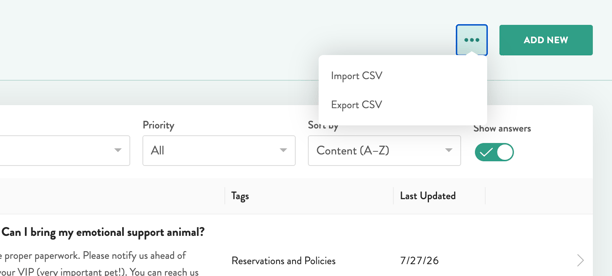
Click the ••• menu next to ADD NEW to Import or Export your content as a CSV file.
- Export CSV pulls your entire content list into a spreadsheet — handy for offline review, reporting, or handing content off to a teammate
- Import CSV lets you add or update many FAQs at once instead of one at a time
HEADS UP: Because a CSV import can overwrite existing content, we recommend reaching out to chatbotsupport@tomis.tech for a template and a quick gut-check before running a large import.
A Few Helpful FAQ Tips
- Don't worry about covering every possible phrasing. The chatbot understands natural language and can interpret variations.
- Keep things conversational. Write your answers like you're talking to a real guest. Include the needed information clearly and helpfully, and the bot will take care of the rest.
- Review regularly. For key updates — seasonality, new discounts, updated policies — come back and update the answer.
You Are in Control
The Knowledge Base gives you full control over your chatbot's understanding of your brand and business. The TOMIS team lays out the foundation, then you have the freedom to edit, add new questions, and make changes as you see fit. Need help tagging content, deciding what should be Priority, or setting up a bulk CSV import? We've got you covered — reach out anytime at chatbotsupport@tomis.tech.