![Yonder_logo (1).png]](https://support.tomis.tech/hs-fs/hubfs/Yonder_logo%20(1).png?height=50&name=Yonder_logo%20(1).png)
Yonder automatically sends survey and review requests to customers via email following events like a trip or room booking. Now, you can also send these requests via SMS, provided a valid mobile number is included in the booking details received from your reservation system.
Prerequisites & Important Notes
- SMS requests are available only for auto-send surveys and cannot be manually sent.
- SMS sending is currently limited to +1 US and Canadian phone numbers.
- Check your Yonder plan to see the number of SMS requests and reminders included.
- It is not possible to send survey requests via SMS only without also sending an email.
- Only the initial survey request can be delivered by SMS. Reminders cannot be sent via SMS.
How to Send Survey and Review Requests via SMS
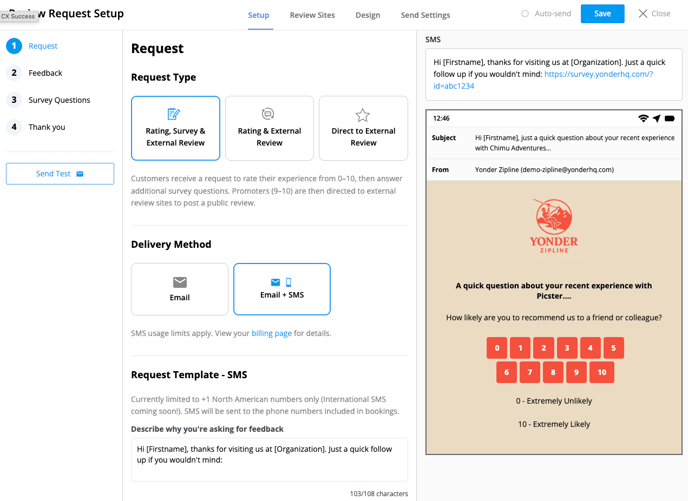
- Log in to Yonder, click on the Reviews tab, and click Setup.
- Under Delivery Method, choose Email + SMS.
- Scroll down to the Request Template – SMS section.
- (Optional) Edit the SMS text as needed. The message will include a unique survey URL at the end.
- Click Save to apply your changes.
Note: SMS requests will only be sent if a valid +1 North American mobile number is available in the booking. International SMS is not yet supported.
SMS Usage Limits
Your Yonder plan includes a monthly SMS send allowance (shared across Pre-Trip SMS and Review Request SMS):
- Growth Plan: 500 review requests and 500 SMS sends per month
- Pro Plan: 1,000 review requests and 1,000 SMS sends per month
- Premium Plan: 2,000 review requests and 2,000 SMS sends per month
- Enterprise Plan: 4,000+ review requests and 4,000+ SMS sends per month
You'll receive email alerts at 75%, 95%, and 100% of your SMS usage. Once your limit is reached, SMS sending will pause automatically.
Need more? Contact our support team to discuss plan upgrades.
Frequently Asked Questions
Can I send a survey request via SMS without also sending an email?
No, SMS requests are always sent alongside an email request.
Can I send SMS survey requests manually?
No, SMS requests are only available for auto-send surveys and cannot be sent manually.
Which phone numbers can receive SMS survey requests?
SMS requests can only be sent to +1 US and Canadian phone numbers. International SMS is coming soon!
Will I be charged extra for SMS survey requests?
This depends on your Yonder plan. Check your plan details to see the number of SMS included.
Can I customise the SMS message content?
Yes, you can edit the message text. However, the unique survey link for the customer will always be appended to the message.
Have other questions? Contact support@yonderhq.com.