![Yonder_logo (1).png]](https://support.tomis.tech/hs-fs/hubfs/Yonder_logo%20(1).png?height=50&name=Yonder_logo%20(1).png)
While TourStore is not compatible with automated review requests, you can still unlock real-time availability in your AI chatbot and manually upload customer emails for survey sending. This integration enhances guest support and streamlines the booking journey.
Step-by-Step Integration Guide
1. Retrieve Your TourStore API Key
- Log in to your TourStore account
- Navigate to your Account Settings or Developer/API section
- Generate or copy your API Key
If you’re unsure where to find this, contact your TourStore account manager or support team.
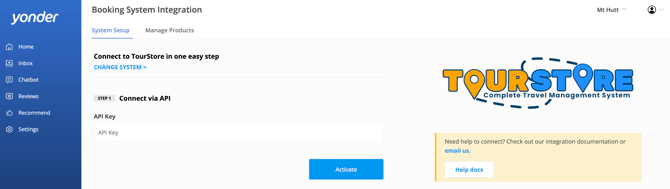
2. Configure the Integration in Yonder
- Log in to your Yonder dashboard
- Navigate to: Settings → Booking System → System Setup
- Select TourStore
- Paste your API Key into the relevant field
- Click Activate to establish the connection
3. Enable Live Availability in the Chatbot
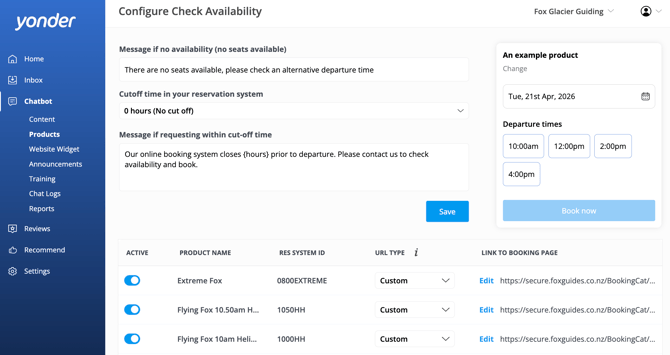
- Go to the Chatbot Products tab in Yonder
- Turn relevant products to Active using the blue toggle
- Keep the pre-populated URL type set to Custom
This ensures your chatbot can display live availability and direct customers to the correct booking page. Learn more about Adding Live Availability to Your Chatbot
Important Notes
This integration supports availability checks only—bookings are completed externally via TourStore. Customers will be redirected to your TourStore booking pages to complete purchases.
- No Booking Sync: Yonder does not store or sync booking data
- Custom Links: Pre-populated, but should be reviewed for accuracy
- No Automated Reviews: Manual survey sending is required. Learn How to Manually Send Surveys.
Frequently Asked Questions
Are automated review requests supported for TourStore?
Not at this time. You’ll need to manually upload and send surveys via Yonder’s dashboard.
Does Yonder sync my TourStore bookings automatically?
No. Yonder only uses TourStore to display live availability in the chatbot.
How long does it take for the integration to activate?
The integration is typically immediate, but please allow a few minutes for data to sync.
Can customers complete bookings inside the chatbot?
No. Customers are redirected to your TourStore booking pages via custom links.
What should I do if some of my products are missing from Yonder?
If any TourStore products are missing after integration, please contact support@yonderhq.com for assistance.
Have other questions? Contact support@yonderhq.com.