![Yonder_logo (1).png]](https://support.tomis.tech/hs-fs/hubfs/Yonder_logo%20(1).png?height=50&name=Yonder_logo%20(1).png)
How to Set Up Template Responses
- Navigate to the Snippets section, either from the Settings menu or via the Manage link within the "Add Template" feature in Conversation and Reviews.
- Click 'Add' to create a new template.
- Provide a descriptive name for easy identification.
- Enter the response text you’d like to save.
- To remove a template, hover over it in the list and click the delete icon on the far right.
How to Use Snippet Responses
In Conversations
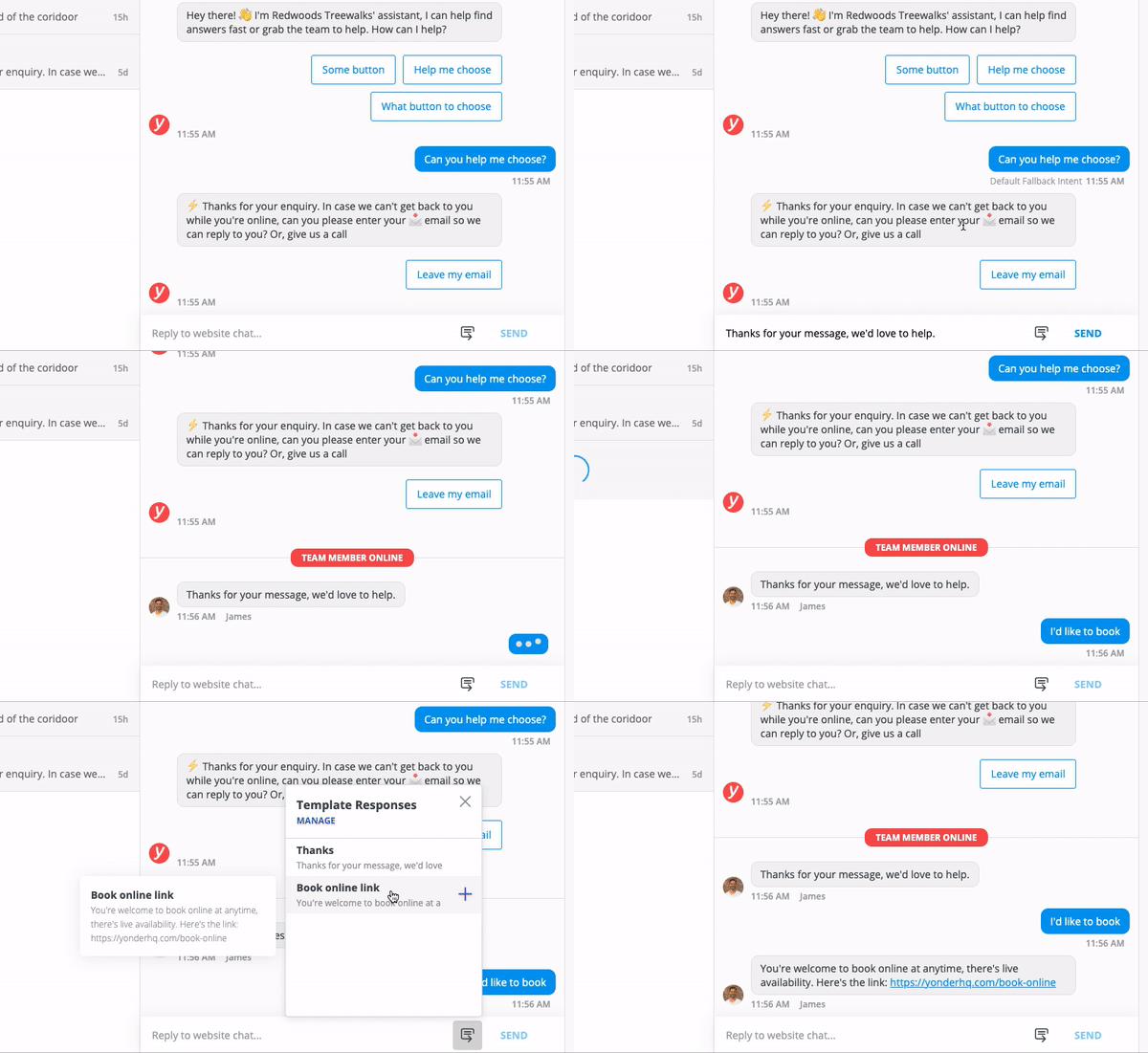
- Click on the snippets icon next to the SEND button.
- Hover over a saved response to preview it.
- Select the desired response to insert it into the chat. The template response will be appended to any existing text in the input box.
Benefits of Using Snippets
In Conversations
- Save time on greetings – Quickly respond to customers who request to speak to a human, increasing the chance of engagement before they leave your website.
- Easily share frequently used links – Store commonly shared URLs, such as booking links, to send them instantly.
- Respond faster with detailed replies – Save commonly used responses that include important details like pricing, cancellation policies, or product descriptions.
Frequently Asked Questions
Can I edit a snippet once it has been created?
Yes, you can edit existing templates by navigating to the Snippets section, selecting the template, and updating its text.
Will using snippets make responses sound impersonal?
No, snippets provide a starting point. Staff can customise responses before sending them to maintain a natural and engaging tone.
Can multiple team members use the same snippets?
Yes, snippets are accessible to all team members, ensuring consistency in responses across your team.
Is there a limit to how many snippets I can create?
There is no strict limit, but it's best to keep snippets organised and relevant to avoid clutter.
Have other questions? Contact support@yonderhq.com