![Yonder_logo (1).png]](https://support.tomis.tech/hs-fs/hubfs/Yonder_logo%20(1).png?height=50&name=Yonder_logo%20(1).png)
Your Voice Agent is answering calls — but how do you know if it’s truly making an impact? The Reports section connects the dots between call activity, team workload, SMS engagement, and bookings, giving you a clear view of Voice’s real-world performance.
Reporting Overview
Head to Voice → Reports in your Yonder dashboard.
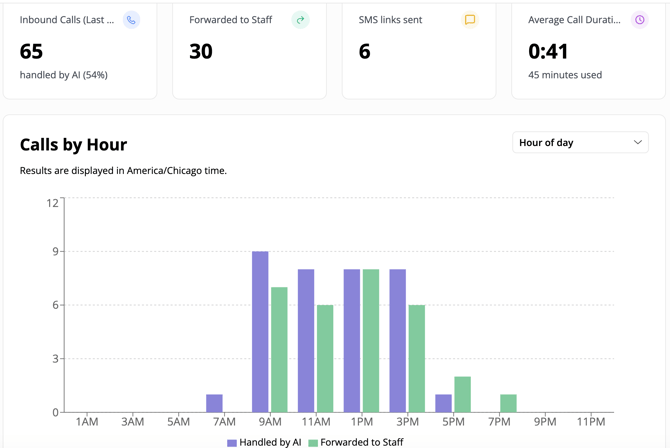
Everyone with Voice enabled gets access to core performance reporting. At the top of the Reports page, you’ll see summary metrics such as:
- Inbound Calls – Total calls received during the selected time range
- Forwarded to Staff – How many calls were transferred to a human
- SMS Links Sent – Total booking or resource links sent via SMS
- Average Call Duration – The average length of Voice conversations
- Minutes Used – Total Voice usage within the selected period
You can adjust the time filter (e.g. Last 24 Hours, Last 7 Days, Custom Range) to spot trends and compare performance over time.
The Calls by Hour graph shows when calls are happening throughout the day, helping you identify peak periods and understand when Voice is reducing the most pressure on your team.
Together, these metrics give you a quick health check of how your Voice Agent is performing.
If you want to review the exact conversations, availability checks, or SMS links sent during a call, head to Voice → Call Logs for full details.
Connecting Google Analytics (GA4)
For deeper insights, you can connect your GA4 account.
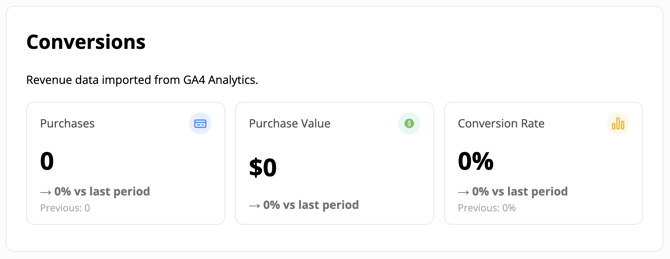
Once connected, the Reports page will include a Conversions section with:
- Purchases
- Purchase Value
-
Conversion Rate
This allows you to see how Voice-generated traffic contributes to bookings and revenue. Instead of just knowing that links were sent, you’ll be able to measure what happened after customers clicked.
To connect GA4, follow the step-by-step instructions in our guide: Getting Started with GA4.
GA4 isn’t required to use Voice, but it’s highly recommended if you want full visibility into booking and revenue performance.
What This Means for Your Business
Turn data into answers. With basic reporting, you can measure operational impact:
- Call volume handled by AI
- Reduction in staff interruptions
- Customer engagement via SMS links
-
When calls are happening most often
With GA4 connected, you can measure revenue impact:
- How many bookings Voice influenced
- How much revenue those bookings generated
-
Conversion rate from Voice traffic
Together, these insights help you move from “Is it working?” to “How well is it working?”
Frequently Asked Questions
Do I need GA4 to use Voice reporting?
No. All Voice users receive core reporting metrics automatically. GA4 is optional — but highly recommended if you want revenue-level insights.
Are reports updated in real time?
Reports reflect completed calls and may update shortly after a call ends.
Are there additional reporting features coming?
Yes. We’re working on expanded reporting such as customer sentiment insights and conversation categories to help you better understand the types of calls your Voice Agent is handling. Stay tuned!
Have questions? Contact support@yonderhq.com