![Yonder_logo (1).png]](https://support.tomis.tech/hs-fs/hubfs/Yonder_logo%20(1).png?height=50&name=Yonder_logo%20(1).png)
The Yonder AI Voice Agent turns every call into an opportunity — maximizing bookings, reducing staff stress, and ensuring your customers always get a timely, personable response.
What is the Voice Agent?
The Yonder Voice Agent answers your incoming calls using natural, human-like conversation. It gives your customers instant support, even when your team is busy, off-site, or closed for the day.
Here's what it can handle:
-
Answer FAQs using your existing Chatbot Content knowledge base
-
Check availability for products and experiences
-
Send SMS links for bookings, directions, waivers, and more
-
Transfer callers to a human when needed
-
Handle multiple calls at once
-
Provide detailed call logs, transcripts, and reporting
It’s designed to work alongside your existing phone system, not replace it.
You keep your current business number and phone provider. Yonder receives forwarded calls and routes them back to your team when required.
Curious about the technology powering our Voice Agent? Check out this article on How the AI Voice Agent Works.
Getting Set Up
Before activating Voice, make sure you meet the setup requirements, including location eligibility, booking system connection, and phone provider (VoIP) compatibility. You can review the full AI Voice Agent Setup Requirements here.
Once you’ve signed up, here’s what onboarding looks like:
-
Our Customer Support team reaches out to confirm your phone provider, call flow goals, scheduling hours, and escalation preferences.
-
Yonder sets up a dedicated phone number for your account so you can test the Voice Agent and review the experience.
-
We work with you to configure call forwarding in your phone provider system (VoIP) so calls route to the Yonder number.
-
Once everything is working as expected, you go live with real customer calls.
That’s it — simple, structured, and supported every step of the way!
Your Voice Agent Dashboard
Once enabled, you’ll have access to a dedicated Voice tab in your dashboard with three main sections:
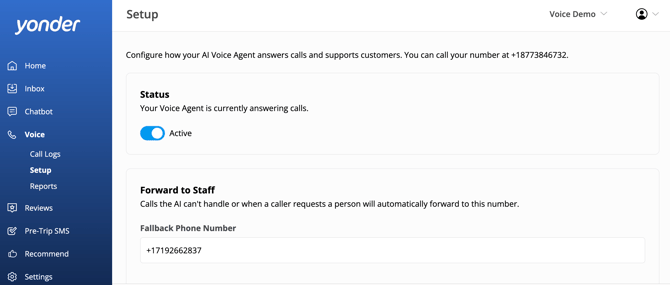
1. Setup
Control how your Voice Agent operates. Turn it on or off, choose your voice personality, set your forwarding number, and customize how calls are handled and escalated.
📘 Learn more: Voice Agent Setup & Configuration Guide
2. Call Logs
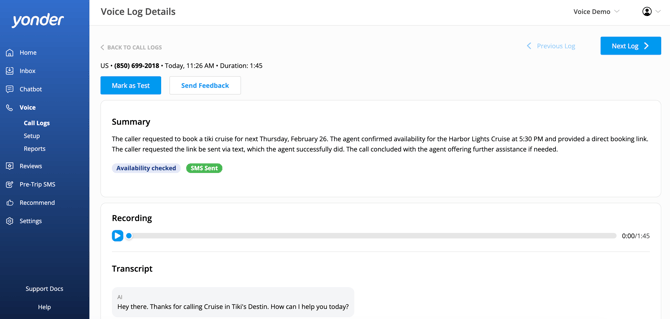
View call recordings, transcripts, summaries, transfers, and detailed system actions. You can see exactly what happened during each call — including which products had availability checked, when SMS links were sent, and when calls were transferred to a human. This is where you review real conversations and monitor performance.
📘 Learn more: Voice Call Logs & Monitoring
3. Reports
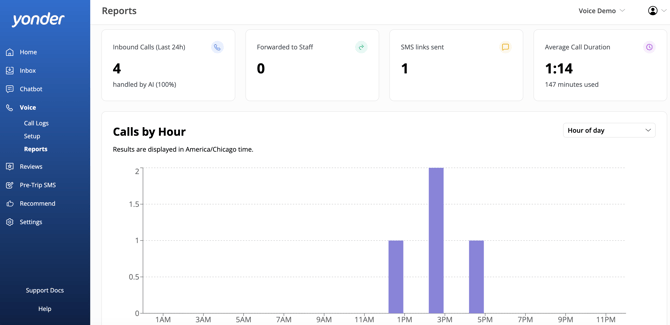
Understand how AI Voice is performing and the impact it’s having on your business. Track call volume, AI-handled calls, transfers, SMS links sent, and average call duration. If GA4 is connected, you can also measure bookings and revenue influenced by Voice.
📘 Learn more: Voice Agent Performance Reporting
Frequently Asked Questions
Can the Voice Agent transfer calls to a human?
Yes. If a caller asks to speak with someone, if the AI cannot confidently assist, or if you’ve configured certain topics to escalate, such as emergencies or booking changes, the call is automatically transferred to your designated “Forward to Staff” number. The caller does not need to hang up or redial.
What are the scheduling options?
AI Voice works alongside your existing phone provider’s routing rules. Most operators forward calls after-hours only, route all calls to AI first, or keep their existing phone tree and direct certain options to the agent. Your VoIP controls when calls are forwarded to Yonder, and the Voice toggle in Yonder does not override your phone provider’s schedule.
How does it integrate with my booking system?
We integrate with major booking platforms including FareHarbor, Peek Pro, Rezdy, Checkfront, Xola, and many more. The AI can check real-time availability and send booking links via SMS after each call.
What languages does it support?
The Voice Agent supports 20+ languages and can automatically detect and respond in your customer's preferred language.
Can it handle multiple calls at once?
Yes. The Voice Agent supports multiple concurrent calls, so you’ll never miss an inquiry during busy periods.
Do we need to disclose that it’s AI?
Many operators choose to include this in their greeting. Call recording and AI disclosure requirements vary by region, so we recommend confirming local requirements if you’re unsure.
Have questions? Contact support@yonderhq.com and our team will guide you through it.